
UK IPTV Speed Guide 2026: What Internet Speed Do You Need?
A customer once rang us furious that our “rubbish” service was buffering during the Liverpool match. He was paying for 500Mbps fibre. We asked him to run one test. His actual throughput to our edge node? 11Mbps. The router was three rooms away, behind a brick chimney breast, broadcasting on a 2.4GHz band shared with every neighbour on the street. The line was fine. The last six metres of air were the problem.
That gap — between the speed you pay for and the speed that actually reaches your screen — is the single most misunderstood thing in this entire industry. This UK IPTV Speed guide exists to close it. Not with the recycled “you need 25Mbps for 4K” line you’ll find on a hundred copy-paste blogs, but with the numbers we actually see in support logs, the throttling patterns we’ve tracked across UK ISPs, and the fixes that resolve roughly four out of five “buffering” tickets before anyone touches the server.
The numbers nobody quotes correctly
Most speed advice quotes the bitrate of the stream and stops there. That’s only half the equation. A stream’s bitrate tells you the minimum sustained throughput required. What it never mentions is headroom — the buffer of spare capacity you need so that a momentary dip doesn’t empty the player’s cache and freeze the picture.
Here’s what we recommend after years of watching where streams actually break:
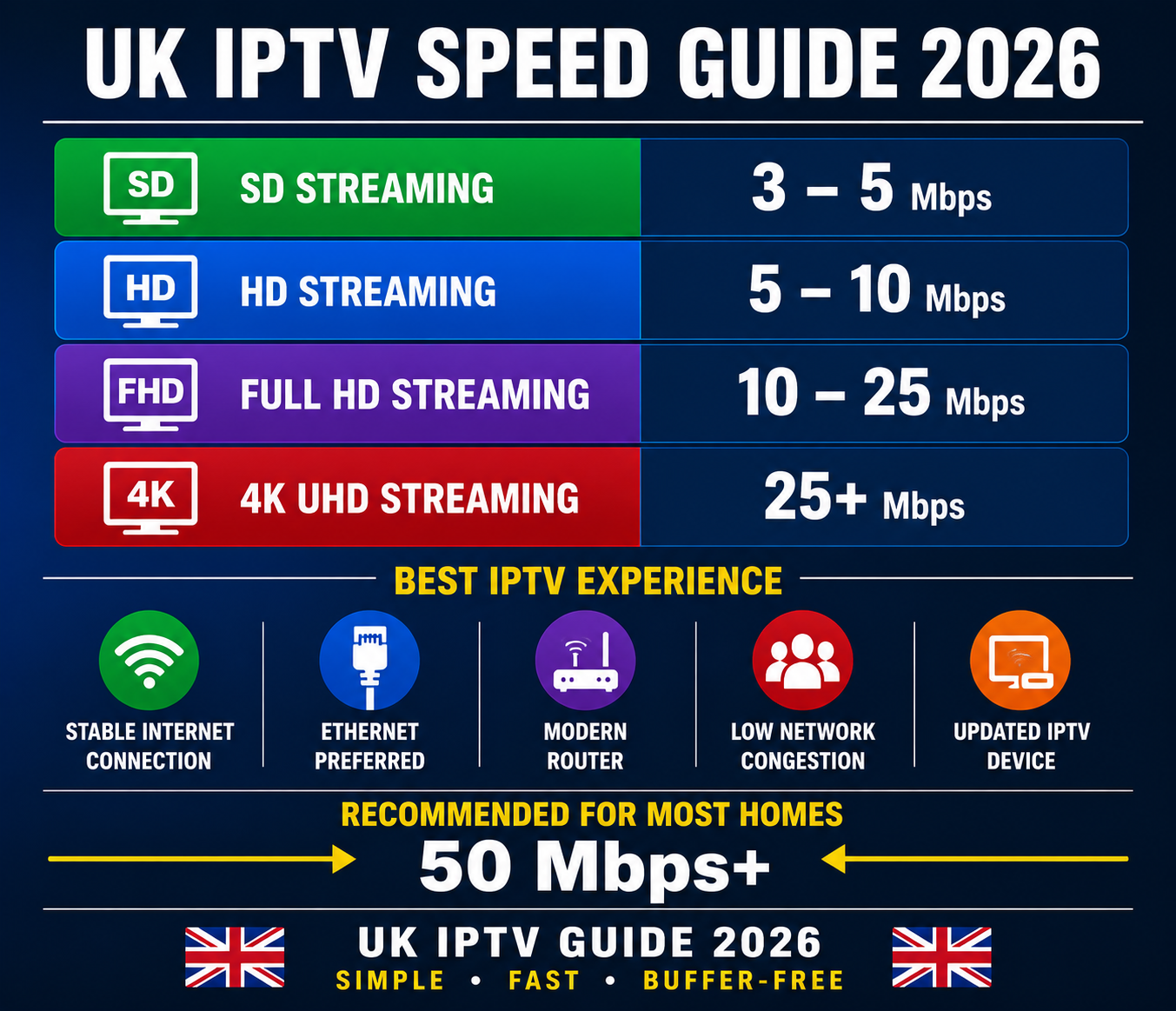
| Stream type | Stream bitrate | Speed to provision (with headroom) |
|---|---|---|
| SD (576p) | 2–3 Mbps | 8 Mbps |
| HD (720p) | 4–6 Mbps | 12 Mbps |
| Full HD (1080p) | 6–8 Mbps | 18 Mbps |
| 4K (HEVC) | 16–25 Mbps | 40 Mbps |
The right-hand column is the one that matters for UK IPTV Speed planning. Provision for the dips, not the average. A 1080p stream that “only needs 8Mbps” will still stutter on an 8Mbps line because there’s nothing left over when the line wobbles — and UK copper lines wobble constantly in the evening.
Pro Tip: Per-device, the bitrate is what counts. But a household watching three streams at once needs the sum plus roughly 20% for overhead from other devices quietly updating, syncing, and backing up in the background. We’ve lost count of how many “your server is slow” complaints turned out to be a games console downloading a 90GB update in the next room.
Why your fibre package lies to you
The number on your bill is a sync speed — the negotiated rate between your router and the exchange. It is not what reaches your TV. Several things eat into it between the green cabinet and your sofa:
- Wi-Fi attenuation. Every wall, floor, and mirror drops signal. 2.4GHz penetrates better but is slower and more congested; 5GHz is fast but dies through brick.
- Contention. “Up to” speeds are shared. At 8pm on a UK estate, your actual throughput can fall to a fraction of the daytime figure.
- Router placement. A router in a hallway cupboard behind the meter is broadcasting into a metal box.
- Old hardware. A router from 2017 running 802.11n will bottleneck a gigabit line without you ever knowing.
This is why the real UK IPTV Speed you receive is almost always lower than the speed you bought — sometimes dramatically. Before blaming any provider, the honest first step is measuring what genuinely arrives at the device that’s actually streaming.
The only test that tells the truth
Speedtest.net run on your laptop over Wi-Fi is nearly useless for diagnosing IPTV. It measures a different path at a different moment. What you want instead:
- Run the test on the device that buffers — the Firestick, the Android box, the smart TV — not your phone.
- Run it at the time it buffers — 8pm Saturday, not 11am Tuesday.
- Run it wired if possible, then again over Wi-Fi, and compare. The gap between those two numbers is your Wi-Fi tax.
After reviewing hundreds of support requests, that wired-vs-wireless gap is the most diagnostic single figure we know of. If wired is healthy and wireless is collapsing, the problem is in the room, not on the network.
The throttling problem most UK users never spot
Here’s something the speed-test-and-move-on crowd misses entirely. A line can pass every speed test and still buffer IPTV — because some UK ISPs apply protocol-level throttling that only kicks in on sustained streaming traffic, not on the short burst a speed test generates.
We first noticed unusual ISP behaviour during a run of midweek Champions League fixtures: a cluster of customers on the same provider all degraded at kickoff, recovered at full time, and tested perfectly fine in between. That’s not congestion. That’s deep packet inspection spotting a long-lived video stream and quietly shaping it down.
Pro Tip: If a connection benchmarks fast but only stutters during long viewing sessions — never during quick tests — you’re likely looking at traffic shaping, not insufficient UK IPTV Speed. A reputable VPN on a nearby UK endpoint will usually confirm it instantly: if buffering vanishes the moment the traffic is encrypted and the ISP can no longer see what it is, you’ve found your culprit.
The catch is that a VPN adds its own overhead and routing distance, so it’s a diagnostic tool first and a permanent fix only if the endpoint is fast and close. A poorly chosen server on the other side of Europe will cost you more UK IPTV Speed than the throttling ever did.
What we see when resellers blame the server
Running the panel side of this for years teaches you a hard truth: most “the stream is buffering” tickets that UK IPTV resellers escalate to us are not server problems at all. When we pull the logs, the pattern repeats.
A mini case study: one reseller was haemorrhaging customers and convinced our infrastructure was failing. We asked him to forward the next ten complaints with the customer’s device and a wired speed test. Of the ten: four were Wi-Fi range issues, three were sub-12Mbps lines trying to push 1080p, two were overloaded cheap Android boxes with no spare RAM, and exactly one was a genuine routing issue we fixed in an hour. He’d been about to switch suppliers over a problem that was 90% in his customers’ living rooms.
The lesson for anyone reselling: your support quality is your UK IPTV Speed reputation. Customers can’t tell the difference between a slow line and a slow server. If you can’t diagnose the difference for them, they’ll churn and blame you.
A reseller’s triage order
When a buffering ticket lands, work it in this order before ever escalating:
- Device first — is it a capable box or a £20 special with 1GB RAM choking on HEVC?
- Connection second — wired speed test on the actual device, at the actual time.
- Wi-Fi third — the wired-vs-wireless gap.
- App settings fourth — buffer size and hardware decoding (more below).
- Server last — only after the first four are clean.
We’ve watched a reseller lose a third of his base in a month simply because he escalated everything to us and left customers waiting days, when 80% of those tickets he could have closed in five minutes himself.
Device and player settings that quietly cost you speed
Two connections with identical UK IPTV Speed can perform completely differently depending on what’s decoding the stream. This is the part subscribers almost never check.
| Setting | Wrong choice | Right choice |
|---|---|---|
| Decoding | Software decoder | Hardware (HW/HW+) decoder |
| Buffer size | Default/minimal | Increased on flaky lines |
| Connection | Crowded 2.4GHz Wi-Fi | 5GHz or wired Ethernet |
| Resolution | Forced 4K on a 1080p panel | Match the screen |
Hardware decoding is the big one. A cheap box forced into software decoding for HEVC will stutter on a line that has bandwidth to spare, because the bottleneck is the processor, not the pipe. In players like TiviMate or IPTV Smarters, switching the decoder from software to hardware resolves a surprising share of “buffering” reports outright.
Pro Tip: On an unstable connection, increasing the buffer often helps more than chasing raw speed. A larger buffer rides out the dips a UK evening line throws at it. The trade-off is a slightly longer channel-change delay — a fair price for a picture that doesn’t freeze mid-goal.
Planning UK IPTV Speed for a whole household
Single-stream advice falls apart in a real home. Picture a typical Saturday night: one 4K stream in the lounge, a 1080p stream upstairs, a tablet on SD in the kitchen, plus the usual background drain of phones and a console.
Add the provisioning figures, not the bitrates: 40 + 18 + 8, plus 20% overhead, lands you near 80Mbps of reliable throughput needed — not sync speed, throughput actually reaching those devices. Suddenly that 100Mbps package with a weak router in a cupboard looks a lot less comfortable.
This is the calculation that should drive a household’s UK IPTV Speed decisions, and it’s why we tell families to fix Wi-Fi distribution — mesh nodes, wired backhaul to the main viewing room — long before they pay for a faster line they’ll never fully receive.
For subscribers weighing up a provider, the reliability of the delivery network matters as much as your own line; a well-run service with proper load balancing won’t be the thing that breaks. If you’re comparing options, it’s worth looking at how an established operation handles peak-time delivery — IPTV UK Reseller providers like britishseller.co.uk live or die on exactly the evening-traffic stability this guide is about.
The infrastructure side, in plain English
You don’t need to run a panel to benefit from understanding what should be happening on the provider’s end. A few concepts decide whether your UK IPTV Speed holds up at peak:
- Load balancing spreads viewers across multiple servers so no single machine drowns when a big match starts.
- Failover means a backup server takes over instantly if one dies — the difference between a two-second blip and a dead evening.
- Geo-routing / CDN sends UK viewers to UK-or-nearby edge nodes, cutting the physical distance your stream travels and the latency with it.
- Backup uplinks give a provider a second route to the internet if the primary one is attacked or saturated.
During a major sports event is when these earn their keep. We’ve seen providers with none of this fall over at 7:55pm on a cup final; the ones with proper redundancy didn’t drop a frame. When you’re choosing where to subscribe, this — not the channel count — is what separates a service that survives Saturday night from one that doesn’t.
FAQ
What internet speed do I need for UK IPTV in 2026?
For a single Full HD stream, provision around 18Mbps of reliable throughput; for 4K, aim for 40Mbps. These figures include headroom above the raw bitrate so brief dips don’t freeze the picture. The right UK IPTV Speed for your home depends on how many streams run at once — add the per-stream figures plus about 20% for background devices.
Why does IPTV buffer when my speed test is fast?
Usually one of three things: Wi-Fi loss between router and device, an ISP throttling sustained streaming traffic that a short speed test never triggers, or a device forced into software decoding. A fast test only proves the line can burst quickly — not that it sustains the throughput a long viewing session demands.
Does a VPN improve UK IPTV Speed?
It can, but it’s situational. If your ISP is throttling streaming traffic, a VPN hides the stream and often restores full UK IPTV Speed. But a VPN also adds overhead and routing distance, so a poorly chosen server slows you down. Use a fast endpoint physically close to you, and treat it as a diagnostic first.
Is wired or Wi-Fi better for IPTV?
Wired wins almost every time. Ethernet removes contention, interference, and distance loss in one move, giving you the full line speed at the device. If wiring isn’t practical, use 5GHz Wi-Fi close to the router, or a mesh system with wired backhaul to your main viewing room.
As a reseller, how do I cut buffering complaints?
Triage before escalating: check the customer’s device, run a wired speed test on it at the time it fails, measure the Wi-Fi gap, then verify player settings. Most tickets resolve in those four steps. Escalating everything to your provider trains customers to wait days and is the fastest route to churn.
Does 4K really need that much more speed?
Yes. 4K via HEVC runs roughly 16–25Mbps versus 6–8Mbps for 1080p, and it demands a capable hardware decoder. On a borderline line or a cheap box, 4K is where stutter appears first. If your screen is 1080p, forcing 4K wastes UK IPTV Speed for no visible gain.
Why does buffering get worse in the evening?
Evening is peak contention on shared UK lines, when neighbourhood traffic spikes and “up to” speeds fall. It’s also when some ISPs apply heavier shaping. If a line tests fine by day and struggles only after 7pm, you’re seeing congestion or throttling, not a faulty service.
Can an old router limit my IPTV?
Absolutely. A router running older Wi-Fi standards bottlenecks even a gigabit line and can’t manage many simultaneous devices. If your hardware predates 2019 or came free years ago with your broadband, it’s often the cheapest single upgrade for better real-world UK IPTV Speed.
Execution Checklist
subscribers
- Run a speed test on the device that buffers, at the time it buffers, wired and wireless.
- Compare the wired and wireless figures; treat a large gap as a Wi-Fi problem, not a service one.
- Switch your player to hardware decoding and match resolution to your actual screen.
- Move to 5GHz or Ethernet for your main viewing room; relocate the router out of cupboards and away from brick.
- If the line tests fine but stutters only on long evening sessions, test with a fast nearby VPN to rule out throttling.
resellers
- Build a fixed triage order — device, connection, Wi-Fi, app settings, then server — and work every ticket through it before escalating.
- Require a wired speed test and the device model with every buffering complaint.
- Keep a one-page UK IPTV Speed reference you can send customers so they self-diagnose the easy 80%.
- Track which complaints turn out to be genuine routing issues; only those belong with your provider.
- Respond fast; slow support reads as a slow service and drives churn faster than any bitrate dip.
sub-resellers
- Don’t oversell 4K to customers on borderline lines or cheap boxes — set expectations at the point of sale.
- Learn to read a speed test so you can settle a complaint without escalating up the chain.
- Recommend a capable device upfront; underpowered hardware generates the bulk of avoidable tickets.
- Keep a shortlist of router and mesh suggestions for customers whose Wi-Fi is the real bottleneck.
That’s the full UK IPTV Speed picture for 2026 — from the real bandwidth numbers and the throttling nobody warns you about, down to the device settings and household maths that decide whether Saturday night holds up. Get the line, the Wi-Fi, the device, and the provider’s infrastructure all pulling the same way, and buffering stops being a mystery and starts being something you can actually fix.